
Download Borsa APK – Istanbul Stock Exchange, Portfolio Tracker, Stock Values, Currency Tracker
Overview
Borsa is a dedicated Android application designed for users interested in monitoring real-time stock values from the Istanbul Stock Exchange (BIST). The app provides instant access to key financial data, including stock prices, currency rates for the dollar, euro, and gold, and visual tracking tools such as daily, weekly, and monthly graphs. It serves as a practical tool for individuals managing personal investments or following market trends in Turkey’s primary financial market. The target audience includes retail investors, traders, and finance enthusiasts who need quick access to localized market data without relying on international platforms.
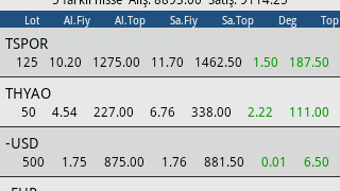
Users can create a personalized portfolio to track specific stocks, input purchase details such as price and lot size, and receive real-time updates on gains or losses. This feature supports informed decision-making by offering a clear overview of investment performance. The app includes a search function to locate stocks efficiently, ensuring users can quickly access relevant information. While the developer did not provide additional background on the Borsa Team beyond the name, the app’s focus on local market relevance suggests a targeted approach to serving Turkish investors. Real-world usage scenarios include daily market checks, portfolio monitoring, and tracking currency fluctuations affecting personal finances.
Key Features & Capabilities
- Real-Time Stock Tracking – Provides up-to-date values for stocks listed on the Istanbul Stock Exchange, enabling users to monitor market movements instantly.
- Currency Rate Monitoring – Tracks the value of major currencies including the US dollar, euro, and gold, offering a comprehensive view of financial trends.
- Personalized Portfolio Management – Allows users to create custom portfolios, input purchase price and lot size, and calculate profit or loss in real time.
- Graphical Data Visualization – Offers daily, weekly, and monthly charts for each stock, helping users identify trends and patterns over time.
- Efficient Stock Search – Includes a search function to quickly locate specific stocks, improving navigation and usability.
- Informative Data Display – Presents relevant financial information to support investment decisions and market awareness.
These features are particularly useful for users who want to stay updated on local market dynamics. For example, a retail investor can track their holdings and assess performance against market changes using the built-in portfolio tool. A trader might use the graphical tools to analyze short-term trends before making buy or sell decisions. The ability to monitor currency values alongside stocks adds context for those concerned about exchange rate impacts on their investments. Although the app does not include advanced reports or analytics, users can reach out to the developer via email for custom feature requests, suggesting a flexible development approach.
User Interface, Workflow & Performance
The user interface of Borsa is designed with functionality and clarity in mind, prioritizing quick access to core features. Navigation appears straightforward, with intuitive layout elements that guide users through stock tracking, portfolio management, and data visualization. The workflow is streamlined, allowing users to search for a stock, view its current value, and add it to their portfolio with minimal steps. Graphs are displayed in a clean format, making trend analysis accessible even for non-expert users.
Performance details were not specified by the developer. However, based on general behavior of lightweight Android applications, Borsa likely maintains responsive performance under normal usage conditions. The app’s file size of 15.2 MB suggests a compact design, which may contribute to efficient operation on a variety of devices.
The developer did not provide information on CPU or RAM usage, so specific resource behavior cannot be confirmed. Stability is expected to be consistent for basic functions, but users should be aware that performance may vary depending on device hardware and network conditions. No issues related to crashes or freezes were reported in the available data.
Compatibility & System Requirements
Borsa is designed to run on Android operating systems. The app is compatible with devices that support the specified version, though exact minimum OS requirements were not listed. The installation size is 15.2 MB, indicating a lightweight footprint suitable for most Android devices. Hardware requirements were not specified by the developer, so users should rely on general Android compatibility standards when installing the app.
Platform compatibility information is limited, and no details were provided regarding support for tablets, wearables, or other Android-based devices. Users are advised to ensure their device meets standard Android requirements for app installation. The app is available as a free download, and no additional system prerequisites were mentioned. For optimal performance, users may want to verify that their device’s operating system is up to date.
Pros and Cons
Pros
- Free to download and use with no upfront cost
- Lightweight size (15.2 MB) ensures easy installation
- Real-time stock and currency tracking for the Istanbul Stock Exchange
- Personalized portfolio with profit/loss calculation
- Visual graphs for daily, weekly, and monthly trends
- Efficient search functionality for stock identification
Cons
- No advanced analytics or report generation features
- Exact system requirements were not specified
- Only available on Android, limiting cross-platform access
- Developer communication is limited to email contact
- Performance behavior under heavy usage not documented
FAQ Section
Is Borsa available for iOS devices?
Currently, Borsa is only available for Android. There is no official iOS version listed in the provided information.
Can I use Borsa offline?
The app requires an active internet connection to fetch real-time stock and currency data. Offline functionality for viewing saved data is not confirmed.
Is Borsa safe to download and use?
Borsa is a free Android application developed by the Borsa Team. It does not contain known security risks based on available information. Users should download the APK from trusted sources to ensure authenticity.
How often does the app update stock prices?
Stock values are updated in real time as long as the app is connected to the internet. The frequency of updates depends on the data feed from the Istanbul Stock Exchange.
Can I request new features from the developers?
Yes, users can contact the Borsa Team via email to suggest new features or report issues, indicating an open channel for feedback.
Final Thoughts + CTA
Borsa delivers a focused and functional experience for users tracking the Istanbul Stock Exchange and related financial instruments. Its core strengths lie in real-time data access, portfolio tracking, and visual trend analysis—features that are essential for informed investing. While the app lacks advanced reporting tools and cross-platform availability, its lightweight design and free access make it a compelling choice for Turkish investors and finance-savvy individuals.
The intuitive interface and straightforward workflow enhance usability, especially for those who prioritize speed and simplicity. For anyone seeking a reliable, no-cost tool to monitor local market performance, Borsa offers solid value. Download Borsa APK now to stay ahead in the dynamic world of Turkish finance.







